Purchasing is where reselling gets real.
Sourcing finds the opportunity. Evaluating tells you whether it is worth taking. But if you never buy inventory, nothing moves, nothing ships, and nothing sells.
The problem is that a lot of sellers treat purchasing like a side quest. They source for a few minutes, find something interesting, stop everything, go buy it, come back, and wonder why the day felt busy but messy.

A better purchasing workflow is more like an assembly line:
- Find leads.
- Evaluate the leads.
- Decide what deserves your money.
- Plan the purchase.
- Create purchase orders.
- Save receipts.
- Track where everything is going.
That is the kind of workflow 3P Mercury is built to support. Instead of turning buying into a pile of open tabs, half-finished carts, and mystery receipts, it gives you a structured way to move from lead to purchase.
Separate Sourcing From Buying
The first rule of effective purchasing is simple: do one job at a time. When you are sourcing, source. When you are evaluating leads, evaluate leads. When you are purchasing, purchase.
Stopping mid-workflow breaks your focus. If you find one good product and immediately go buy it, you move from research mode to checkout mode. Then you come back and try to remember where you were.
Instead, build a pool of good leads first. In 3P Mercury, that usually starts in the Lead Vault or Merc. You can filter products, review profitability, check sales velocity, look at seller competition, review gate status, and decide whether an item is worth considering.
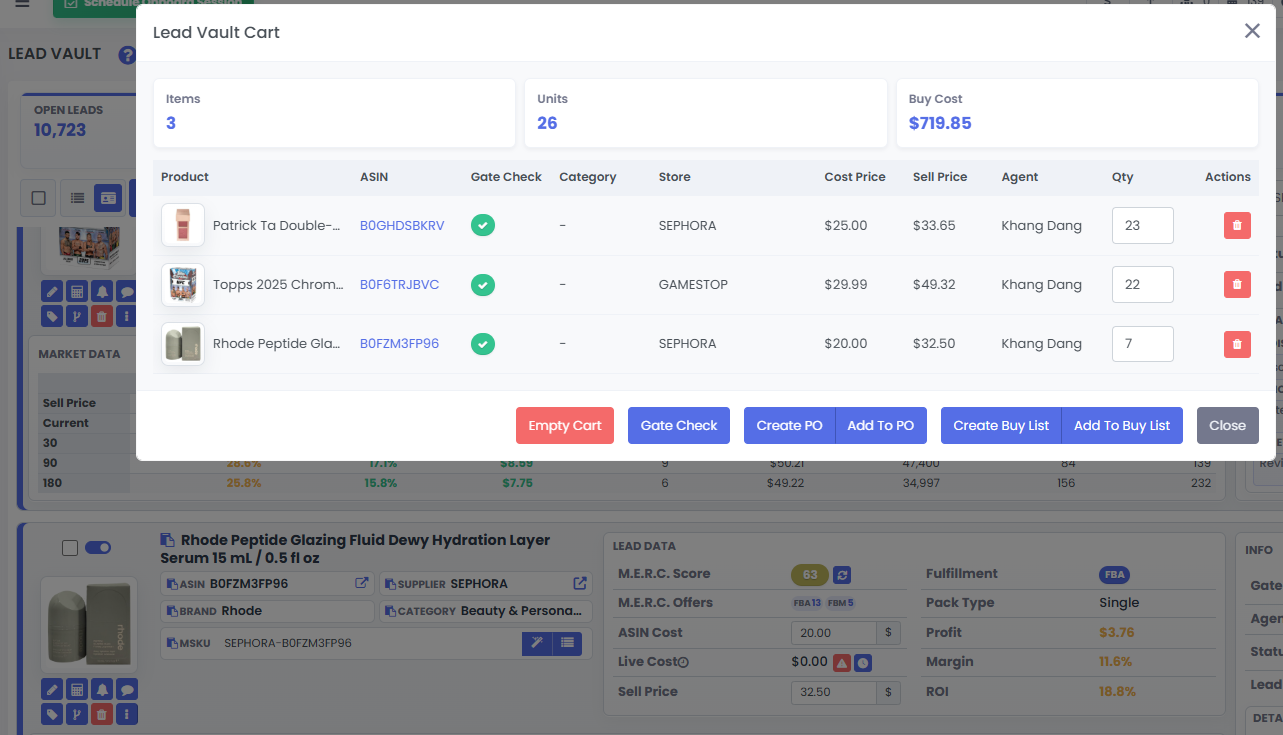
Before buying, ask:
- Is the product profitable at the current cost?
- Is there enough sales velocity?
- Is Amazon selling it?
- Is the brand or one seller dominating the listing?
- Has the buy box been stable enough?
- Have you bought this product recently?
- Is the quantity realistic for the demand?
Once a product passes your checks, add it to the cart. This does not mean you must buy it yet. It means the product is now a candidate for your purchasing plan.
Use Buy Lists To Control Your Budget
Most sellers do not have unlimited cash. Even large sellers have to think about budget, timing, and cash flow.
That is where buy lists become useful. A buy list is a planning layer between "this lead looks good" and "I am placing this order." It lets you group products, review total cost, prioritize better opportunities, and decide what actually fits your budget.
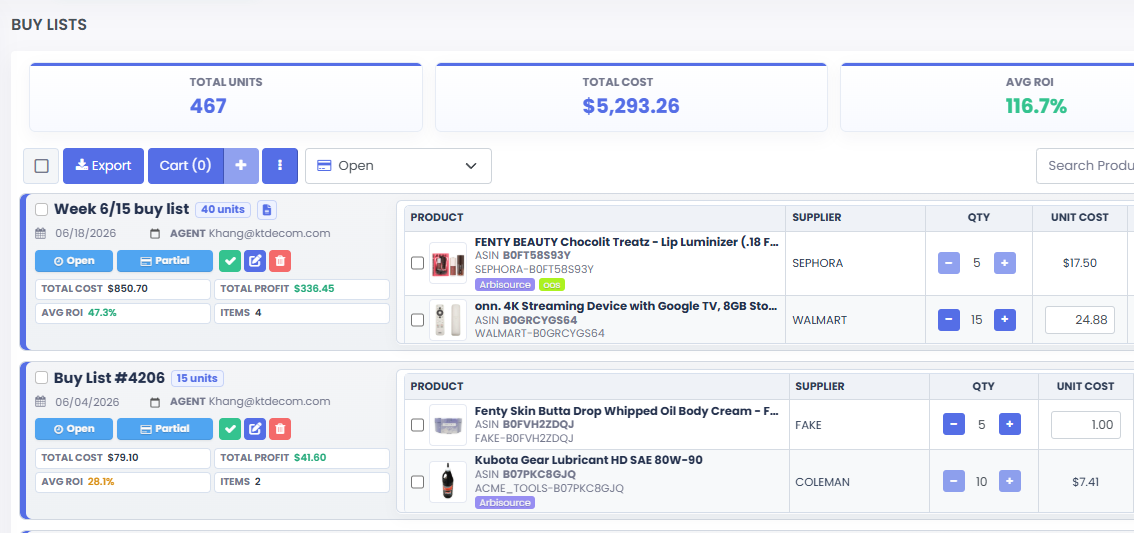
You can organize buy lists by supplier, week, purchase date, team member, budget bucket, or retail trip. There is no single perfect system. The point is to create a structure you can actually use.
If you have a $2,000 budget this week and your buy list totals $5,000, the software makes that problem visible. Now you can make better decisions.
Once your candidates are in a buy list, review total cost, total units, ROI, unit profit, sales velocity, seller count, recent purchase history, and whether the quantity still makes sense.
Sometimes a product is technically profitable but still not the best buy. Maybe the ROI is okay, but the unit profit is weak. Maybe you already bought it last week. Maybe demand is too low for the quantity you originally picked.
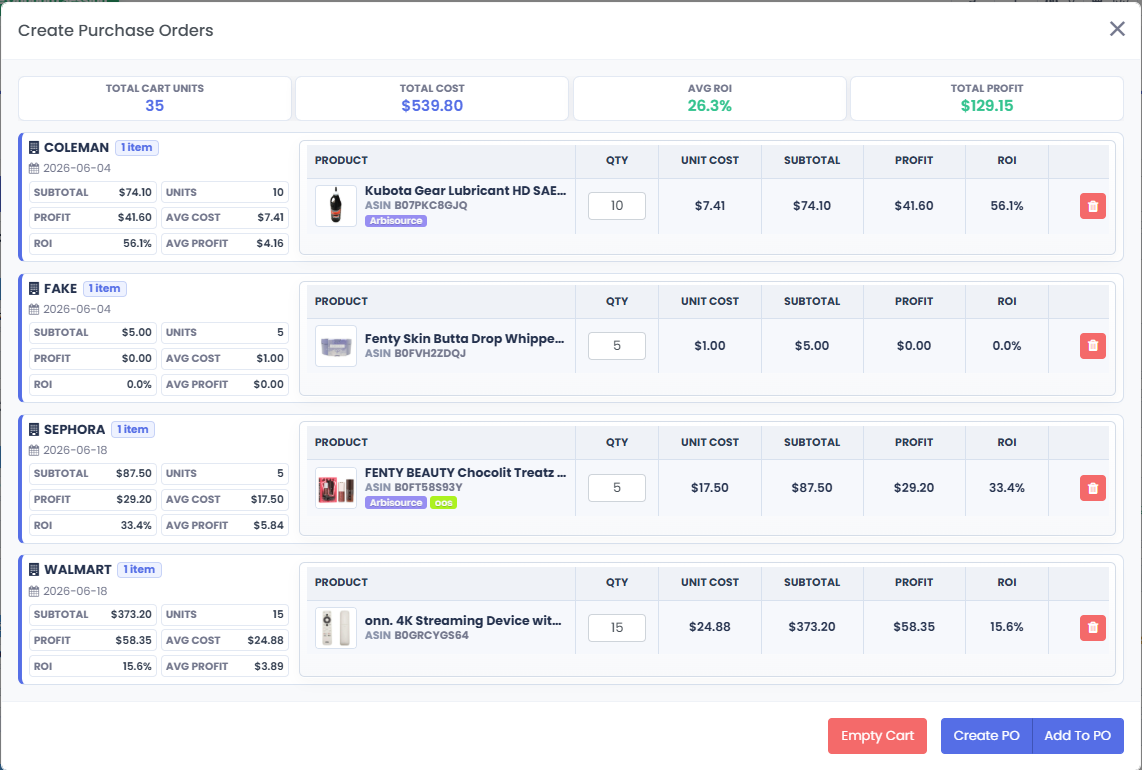
3P Mercury keeps those details in front of you. You can adjust quantities, update costs, remove products, or leave lower-priority items in the buy list for later.
This is also where Merc can speed things up. Merc simplifies the data into a score and highlights the checks that matter. If you like seeing more raw data, the Lead Vault gives you a deeper manual view. Either way, decide what deserves to be purchased before money leaves your account.
Good purchasing is not about buying every product that looks decent. It is about buying the right products in the right order with the right amount of capital.
Turn Purchases Into Purchase Orders
After you decide what to buy, the next step is organization.
When products are added to the cart in 3P Mercury, they can be grouped by supplier and turned into purchase orders. This gives each order a record instead of leaving everything scattered across tabs, emails, and downloaded PDFs.
Purchase orders help you track supplier, order number, product details, ASIN, MSKU, purchase quantity, unit cost, source URL, ship-to location, receipts, attachments, and notes.
At the time of purchase, it may feel obvious where everything came from. Three weeks later, when you need a receipt for Amazon, a return, a prep center question, or your own bookkeeping, it may no longer be obvious at all. Purchase orders store the answer while it is still fresh.
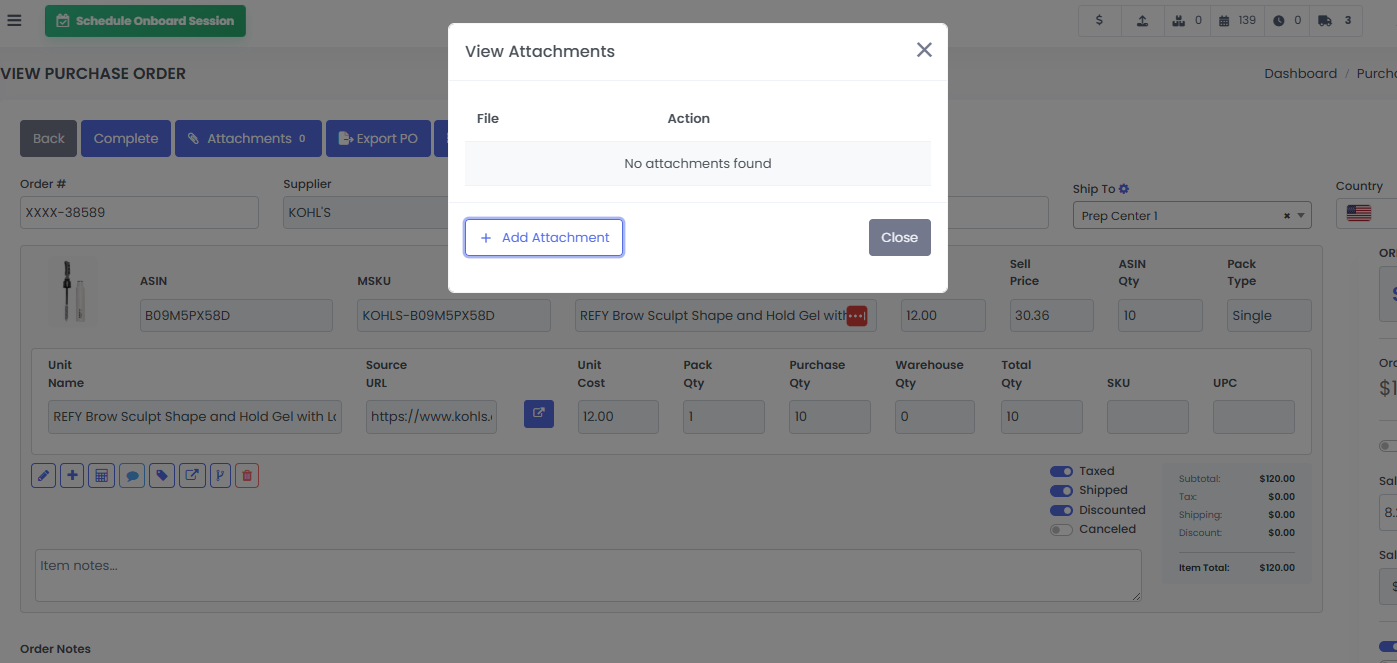
After checkout, save the supplier receipt as a PDF and attach it to the purchase order. If Amazon asks for documentation, or if you need to look up an old receipt, you can search your purchase order records and pull the attachment instead of digging through your email like an archaeologist with a caffeine problem.
This is not just neatness. It protects your time and reduces future stress.
Use Ship-To Locations And Shopping Lists
Purchasing does not end when you place the order. You also need to know where the inventory is going.
Some sellers ship everything to their own location. Others use one prep center. Others split orders between multiple prep centers, warehouses, or home addresses. If that information is not tracked clearly, receiving and checking in inventory gets harder than it needs to be.
3P Mercury lets you mark ship-to locations on purchase orders, which helps keep the purchase tied to its destination. That is especially useful if you work with prep centers or split inventory between locations.
For retail arbitrage sellers, the shopping list feature adds another layer of convenience. Instead of walking into a store with a vague memory of what you planned to buy, you can use a mobile shopping list that shows which store you are shopping, which products to buy, how many units to buy, purchase order grouping, aisle notes, and receipt capture.
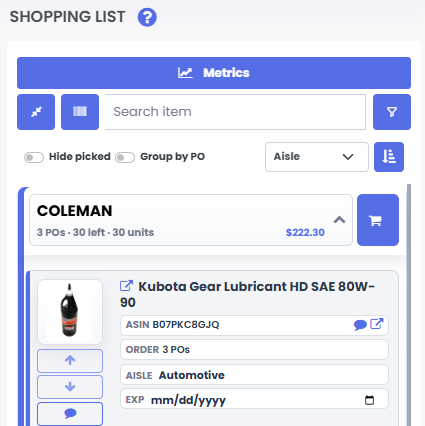
For retail arbitrage, receipt capture is a big deal. When you take a picture of the receipt from your phone, it can stay attached to the purchase record instead of floating around in your camera roll forever.
That makes the whole workflow cleaner: Lead Vault to buy list. Buy list to purchase order. Purchase order to shopping list. Shopping list to receipt. Receipt back to the purchase record. Everything has a place.
Think About Cash Flow
Budget tells you how much you can spend. Cash flow tells you when that money has to be paid back, recovered, or reused.
For online arbitrage, wholesale, and similar models, many sellers use credit cards to manage purchasing cycles. Used responsibly, credit cards can help extend the time between buying inventory and paying the bill. That gives inventory more time to arrive, check in, sell, and generate revenue.
The key phrase is used responsibly. Credit is not free money. It is timing. If it helps your business and you can pay the balance, it can be useful. If it causes you to overbuy or carry expensive debt, it can hurt you quickly.
One practical cash-flow habit is to understand your card statement dates. If you have multiple cards with different closing dates, you may be able to choose the card that gives you the longest payment window for that purchase. Some sellers even set up different cards with different statement cycles so they can spread purchases across the month.
Again, this only works if you are disciplined. The goal is to match purchases, inventory movement, and payment timing more intelligently.
3P Mercury supports this by helping you see what you plan to buy before you buy it. Buy lists show projected spend. Purchase orders record what actually happened. Together, they make cash-flow planning easier to manage.
A Simple Purchasing Workflow To Follow
- Source or import leads into 3P Mercury.
- Evaluate leads in the Lead Vault or Merc.
- Add possible buys to your cart.
- Move selected products into buy lists.
- Review total cost, ROI, unit profit, and quantity.
- Prioritize based on budget and cash flow.
- Create purchase orders by supplier.
- Place the orders with the supplier.
- Attach receipts to the purchase orders.
- Mark ship-to locations or use the mobile shopping list when needed.
- Close out completed buy lists so your workspace stays clean.
That is the whole idea: keep each step separate, repeatable, and visible. When purchasing is organized, you are less likely to forget a coupon, skip cash back, lose a receipt, buy too many units, or spend your whole budget on the first shiny product that looks profitable.
Related Reading
Before you buy, it helps to know how to evaluate leads manually and with 3P Mercury. If you need more products to review, start with the guide on finding good leads in bulk.
FAQ
What is the best way to purchase inventory for reselling?
The best way is to separate sourcing, evaluation, purchasing, and record keeping into clear steps. This helps you stay focused, manage budget, avoid duplicate buys, and keep receipts tied to each order.
What is a buy list in 3P Mercury?
A buy list is a planning tool that lets sellers group products they may want to purchase, review total cost and ROI, assign purchase dates, and decide what fits their budget before creating purchase orders.
Why should sellers use purchase orders?
Purchase orders keep supplier, product, quantity, cost, ship-to location, notes, and receipt details in one place. That makes it easier to find records later for Amazon requests, returns, prep centers, or bookkeeping.
How does 3P Mercury help retail arbitrage sellers?
3P Mercury can turn planned purchases into mobile shopping lists, helping sellers see what to buy in store, track quantities, and capture receipts from their phone.
Final Thought
The best purchasing workflow is not complicated. It is focused.
Build your leads. Evaluate them. Plan your buy. Create records. Save receipts. Track where everything is going.
3P Mercury turns that into a connected process instead of a pile of separate chores. Leads live in the vault. Buying candidates move into buy lists. Final purchases become purchase orders. Retail arbitrage trips can become shopping lists. Receipts stay attached to the records where they belong.
That is how purchasing becomes less chaotic and more effective.
Simplify Your Reselling Workflow
Sign up for 3P Mercury to simplify your business. The one software that takes you from sourcing to shipping, automated with the power of AI.
Sign up for 3P Mercury