
Finding a profitable ASIN once is good. Reordering it at the right time, in the right quantity, and at the right cost is how it becomes a business.
Restocking should be easier than sourcing a brand-new product because you already have evidence. You know what the item actually sold for, how quickly it moved, what Amazon charged, and whether customers returned it.
The mistake is assuming that yesterday's winner is automatically today's winner. Supplier costs change. Competition enters. Amazon joins a listing. Prices fall. Your account can even lose eligibility to sell the ASIN.
A proper restock process uses your real sales history, refreshes the current market conditions, and gives your cash to the strongest opportunities first.
Prefer to watch the workflow?
Watch the full restocking workshop below to see the settings, buckets, filters, cost updates, and quantity recommendations in action.
Watch the restocking workshop directly on YouTube.
Configure Your Restock Rules First
Before reviewing individual ASINs, decide what a good restock means for your business.
In 3P Mercury's Restock settings, define:
- Profitability target: Choose ROI or margin and set the minimum you require.
- Purchase age filter: Hide recently reordered products long enough to avoid buying the same inventory twice.
- Supplier lead time: Account for ordering, supplier shipping, prep, and inbound receiving.
- Safety period: Add extra coverage when stock-outs would be costly.
- Default purchase quantity: Set a conservative retest quantity for products without useful recent velocity.
- Price basis: Choose the market price used for the profitability calculation.
- Sales velocity range: Decide how much recent sales history should influence the recommendation.
These are controls, not universal answers. A 14-day purchase age filter or 30-day supplier lead time may make sense for one workflow and be completely wrong for another. Use the time your operation actually takes.
Supplier lead times deserve special attention. If one supplier ships in three days and another takes four weeks, they should not trigger the same reorder date. Set supplier-specific lead time and safety coverage where needed.
Adjust for seasonal velocity
Historical averages can understate demand before a known peak. 3P Mercury allows sellers to apply a velocity modifier for a date range, either globally or for a specific ASIN.
For example, if an item normally calls for 10 units and you apply a 25% seasonal modifier, the recommendation may increase to 12 or 13 units after rounding. A product with a much stronger Q4 pattern can receive its own override rather than forcing every ASIN to use the same increase.
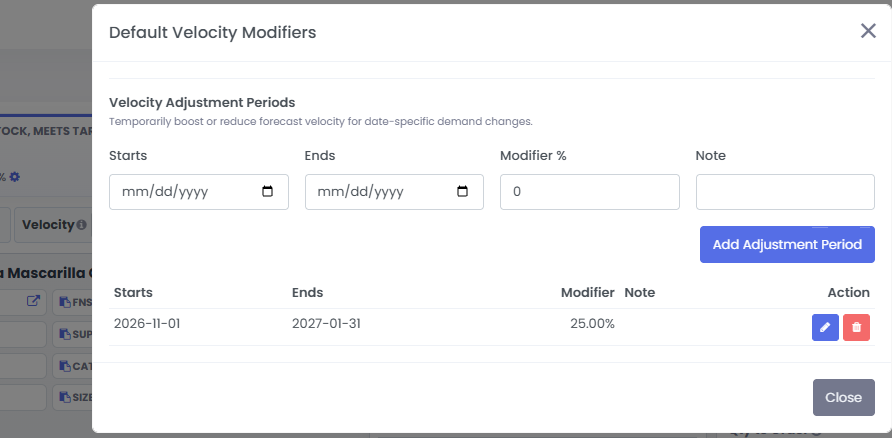
Use modifiers only when your own history supports them. "Q4 is coming" is not a substitute for checking what that product did last Q4.
Start With the Profitable Restock Bucket
3P Mercury separates restock candidates into practical buckets:
- Need Restock, Meets Target: Current profitability meets your selected ROI or margin goal.
- Need Restock, Below Target: The product needs inventory but does not meet the target, or its cost needs review.
- Need Restock, Losing: The current calculation shows a loss.
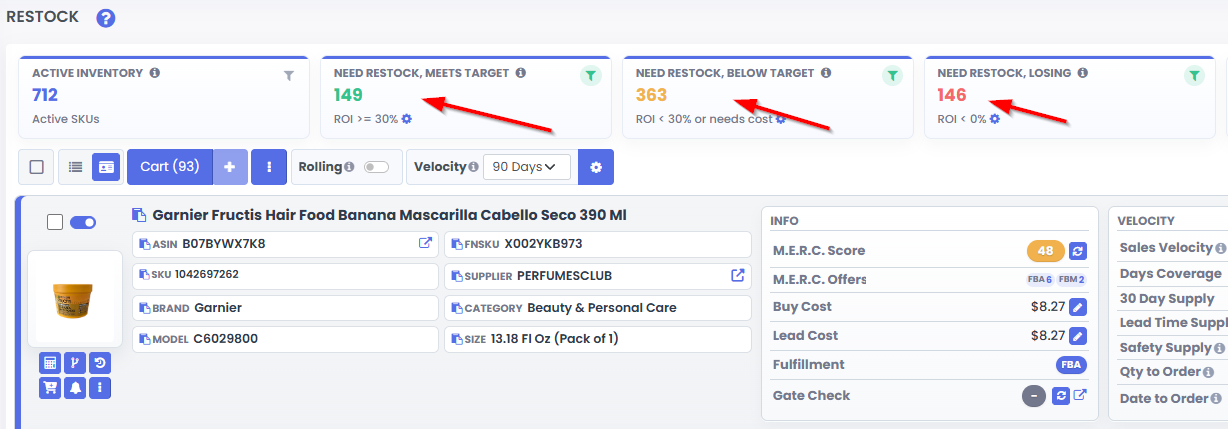
Work one bucket at a time. Start with Meets Target because those ASINs are the clearest candidates for today's purchasing budget.
The bucket is a priority list, not an automatic checkout button. Before reordering:
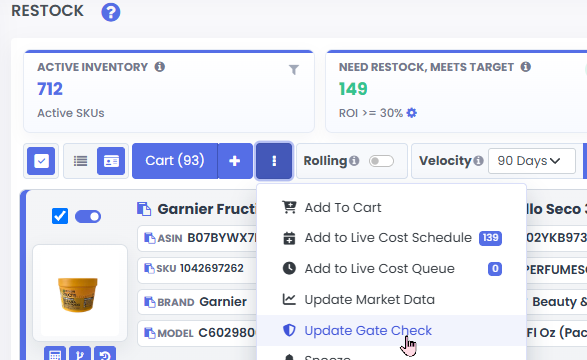
- Refresh the gate check to confirm the account can still sell the ASIN.
- Confirm the source still matches the exact product and pack size.
- Update the supplier cost.
- Review current competition, Amazon presence, price stability, and risk.
- Check current stock, inbound units, and outstanding purchase orders.
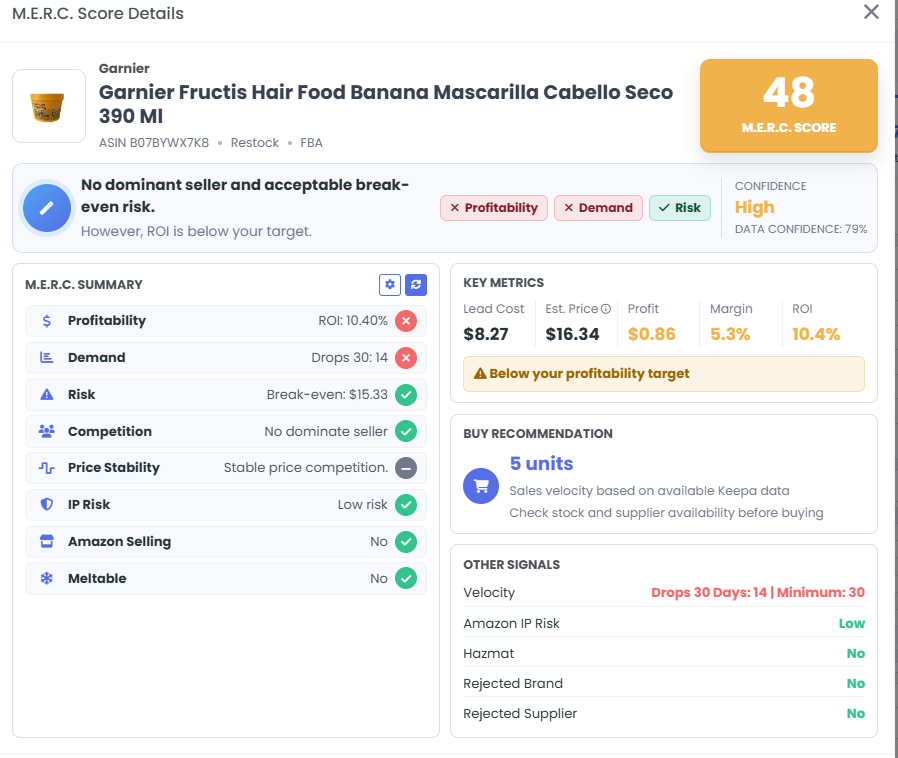
M.E.R.C. automates much of the market review by evaluating profitability, demand, competition, risk, price stability, Amazon presence, and other signals. The Restock page then combines that market analysis with your inventory and sales data.
Refresh costs before trusting the bucket
For online arbitrage products with supplier URLs, send candidates to the Live Cost Queue. It can refresh supplier pricing and availability in bulk. When costs change, ASINs can move between restock buckets automatically.
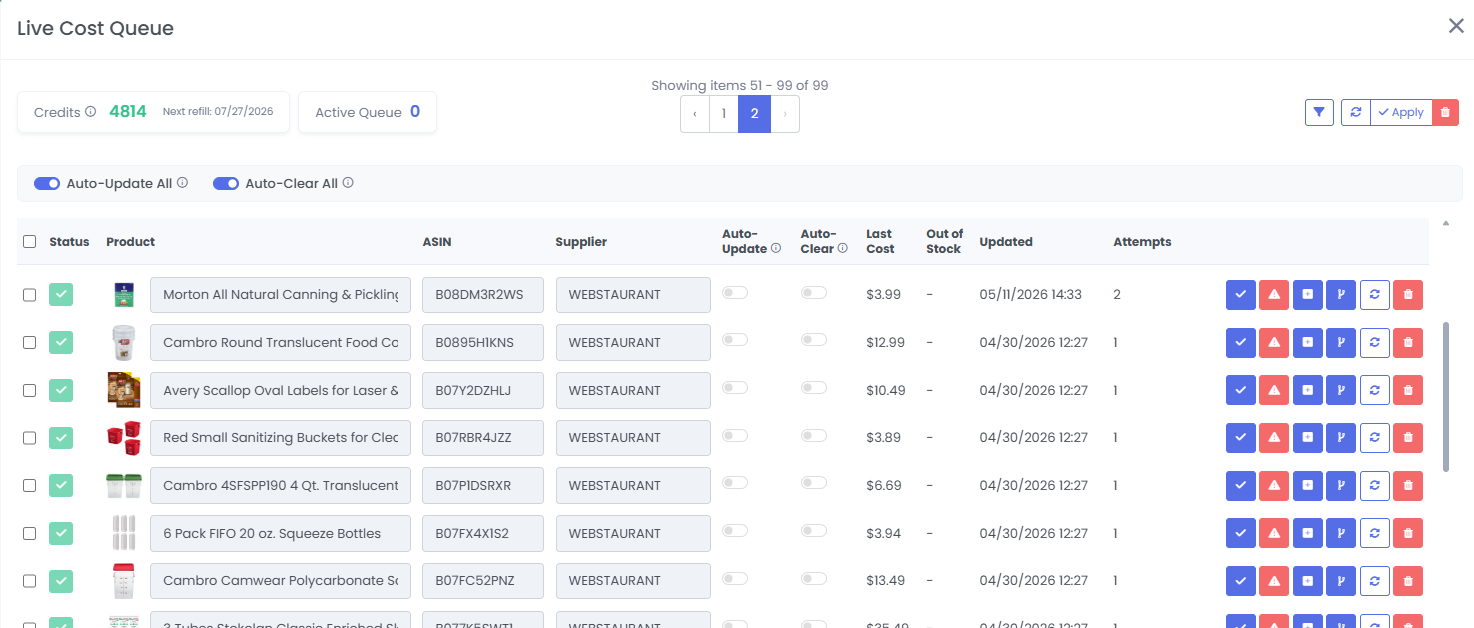
Wholesale sellers can upload the supplier's current catalog or price sheet instead. Once the new ASIN costs are imported, return to Restock and refresh the analysis.
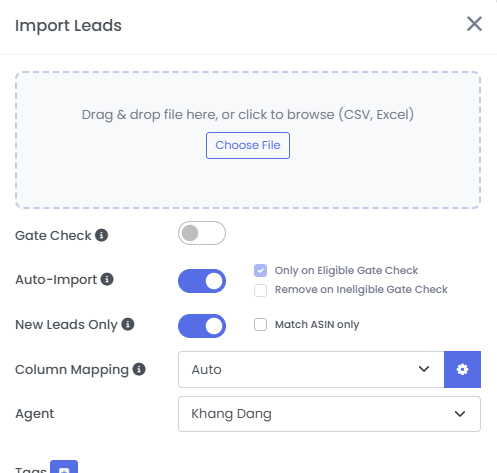
Do this before approving orders. A product is not still profitable merely because the cost field remembers a happier time.
Order Quantities From Actual Sales Data
A first test often depends on estimates. A restock should depend on evidence.
For an ASIN you have already sold, review:
- Actual unit sales by time range
- Real selling prices
- Actual profit, margin, and ROI
- Refunds and returns
- Current fulfillable, reserved, working, receiving, and inbound stock
- Open purchase orders or units not yet received
- Supplier lead time and safety stock
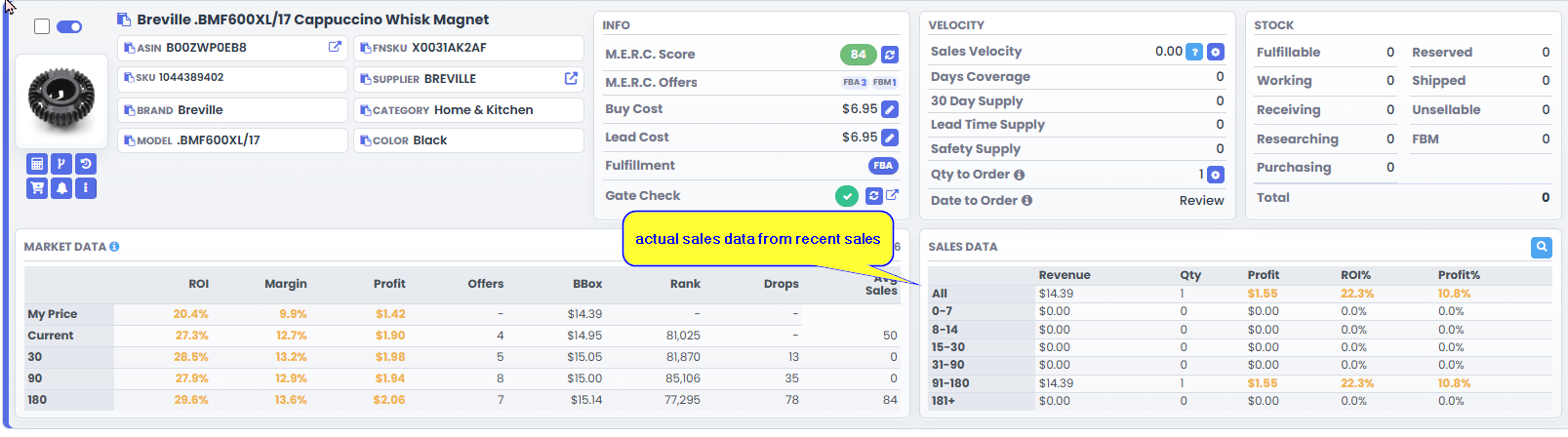
Refunds matter because gross sales can hide a bad product. If three units sold and all three came back, the reorder quantity is not three. It is probably zero until you understand the problem.
3P Mercury uses actual sales velocity when enough useful history exists. It combines that rate with available stock, coverage, lead time, safety supply, and outstanding inventory to calculate a quantity and order date. When you add the ASIN to the cart, the recommended quantity is added with it.
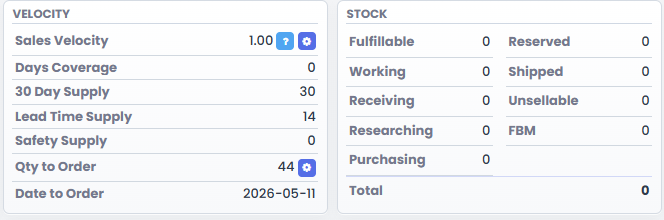
When there is no useful recent velocity, the system should not pretend otherwise. It uses your default purchase quantity and marks the date for review. Treat that as a conservative retest, not a confident forecast.
Before accepting any quantity, ask:
- Is the velocity recent enough to represent current demand?
- Did a temporary promotion create the sales spike?
- Are returns included in the result?
- Is inventory already inbound or on an open purchase order?
- Is the coming season stronger or weaker than the measured period?
- Can cash flow support the recommended units?
Automation should remove arithmetic and repetitive checking. It should not remove judgment.
Repair Below-Target and Losing Restocks
After purchasing the products that meet your target, review the weaker buckets. "Below target" and "losing" do not always mean "never buy again." They mean the current cost and selling-price assumptions do not work.
For online arbitrage, look for:
- Product or category coupons
- Sitewide sales
- Loyalty discounts
- Discounted gift cards
- Cashback
- A different credible supplier
Stack only discounts you are actually eligible to use, and recalculate the landed cost after every change. Live Cost Updates can refresh a supplier's listed price, but promotional codes and other discounts may still need manual review.
For wholesale, ask whether a proven purchase history can support better unit pricing, a volume break, longer payment terms, freight improvements, or a temporary discount on an overstocked SKU.
Do not increase quantity merely to unlock a discount unless the sales velocity can support it. Cheap inventory that sits for six months is still expensive inventory.
Once the cost changes, update it and let 3P Mercury recalculate the bucket. A repaired ASIN can move back into the profitable restock queue.
Find Opportunities Beyond the Current Buy Box
Some of the best restocks are hiding in the below-target bucket because the current Buy Box is a poor assumption for your future selling price.
Use Restock filters to find products with decreasing seller count, very few FBA offers, strong historical sales, recovering prices, Amazon out of stock, or enough break-even room to test a higher price.
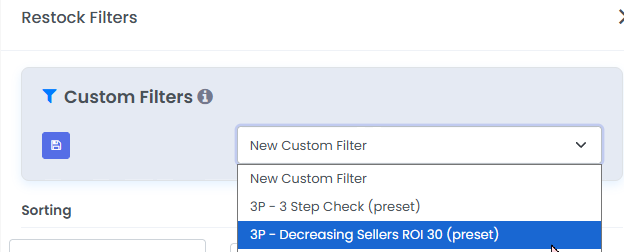
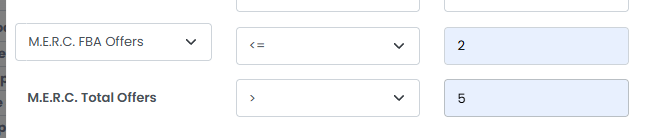
Imagine a listing with several total offers but only one FBA seller. The current lowest offer may come from a merchant-fulfilled seller with a slower delivery promise. Your FBA offer may be able to sell at a higher price.
This is not permission to invent any price you want. Check historical price behavior, demand, seller trends, and your break-even point. Test a controlled quantity above the current Buy Box and use a repricing rule that changes strategy if the inventory sits too long.
A good restock routine is therefore three passes:
- Buy the products that still meet your target.
- Repair products that need a better cost or updated data.
- Investigate low-competition products that may support a better selling price.
That turns restocking from "buy what sold before" into a disciplined allocation of cash toward the ASINs most likely to earn it back.
For the surrounding workflow, review how to purchase inventory effectively with 3P Mercury.
Frequently Asked Questions
What should I check before restocking an Amazon ASIN?
Verify current eligibility, supplier cost, profitability, competition, Amazon presence, actual sales velocity, refunds, available and inbound stock, supplier lead time, and cash-flow capacity.
How does 3P Mercury calculate restock quantity?
When recent sales data is available, 3P Mercury uses actual velocity with stock coverage, lead time, safety supply, and outstanding inventory. Without useful velocity, it falls back to the seller's default purchase quantity for a conservative review.
Should I restock a product below my ROI target?
Not at the current assumptions. First look for a better cost, valid promotions, wholesale negotiations, lower competition, or evidence that a higher selling price is realistic. Recalculate before purchasing.
Why do refunds matter when restocking?
Returns reduce real profit and can make strong-looking sales misleading. Use net results from completed orders rather than gross unit sales alone.
Can I price a restock above the current Buy Box?
Sometimes. Low FBA competition, falling seller count, strong demand, or faster delivery can support a higher offer. Test conservatively and set a fallback pricing rule if the units do not move.
Make Restocking the Easiest Part of the Week
Sign up for 3P Mercury to simplify your business. The one software that takes you from sourcing to shipping, automated with the power of AI.
Sign up for 3P Mercury