
Most Amazon sellers do not lose money because they cannot find products.
They lose money because they find products that look profitable, buy them, ship them, wait, sell them, and only then discover the profit was quietly eaten by fees, prep, price drops, storage, and one tiny detail they forgot to check.
That tiny detail usually has a very expensive personality.
A profit calculator fixes the problem before the purchase happens. It helps you answer the only question that matters when looking at an ASIN: If I buy this product at this cost and sell it at a realistic price, do I actually make money?
Not revenue. Not "it sells a lot." Not "the coupon looked good." Actual profit.
That is why 3P Mercury's profit calculator Chrome extension is free. Every seller should have quick access to the math before they spend a dollar on inventory.
A Profit Calculator Shows the Real Number
The simplest version of Amazon math looks like this:
Sale price - product cost = profitUnfortunately, that version belongs in a museum.
Real Amazon math looks more like this:
Sale price
- referral fee
- FBA fulfillment fee
- inbound shipping
- prep cost
- label cost
- storage cost
- misc fees
- cost of goods
= estimated net profit
A profit calculator puts that math in front of you while you are researching the product. Instead of guessing, you can see estimated Amazon referral fees, FBA fees, product cost, shipping, prep, net profit, ROI, margin, and break-even price.
That last part matters. A product with $6 profit before extra costs may be a good lead. A product with $6 profit before inbound shipping, prep, labels, storage, and price movement may be a politely disguised headache.
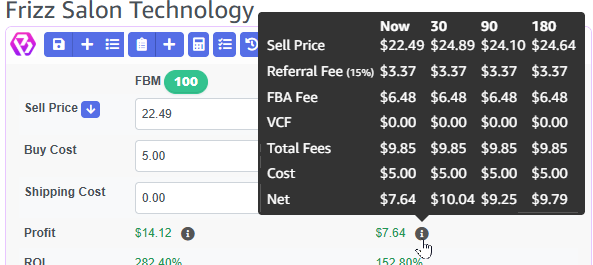
The goal is not to make every product look bad. The goal is to make bad products reveal themselves early.
Grab 3P Mercury's Profit Calculator Absolutely Free
Register for a free account and you immediately get access to use the free calculator. If you later want to join 3P Mercury to get all the features from sourcing to shipping, you can subscribe with the same account.
Get the Free Profit CalculatorIt Helps You Avoid Fee Surprises
Amazon fees are not one-size-fits-all.
Two products can sell for the same price and have completely different profit because they fall into different categories, size tiers, weights, or fulfillment paths. Amazon's own resources explain that fee estimates can include referral fees, fulfillment costs, storage, and other selling costs. A small item and a bulky item may both sell for $29.99, but they do not live in the same fee universe.
A good calculator helps sellers catch the big fee issues before they buy:
- Higher referral fees in certain categories
- FBA fees driven by size and weight
- Products that are too bulky for the margin
- Low-price items where minimum fees hurt badly
- Storage costs that matter if the product moves slowly
- Prep and packaging costs that change the real buy cost
- Inbound shipping that turns "pretty good" into "please stop"
This is especially important for online arbitrage, wholesale, and replens because sellers often compare a supplier price against the Amazon selling price quickly. Fast research is useful, but fast wrong research is still wrong.
3P Mercury lets sellers add custom costs so the calculator reflects how their business actually operates.
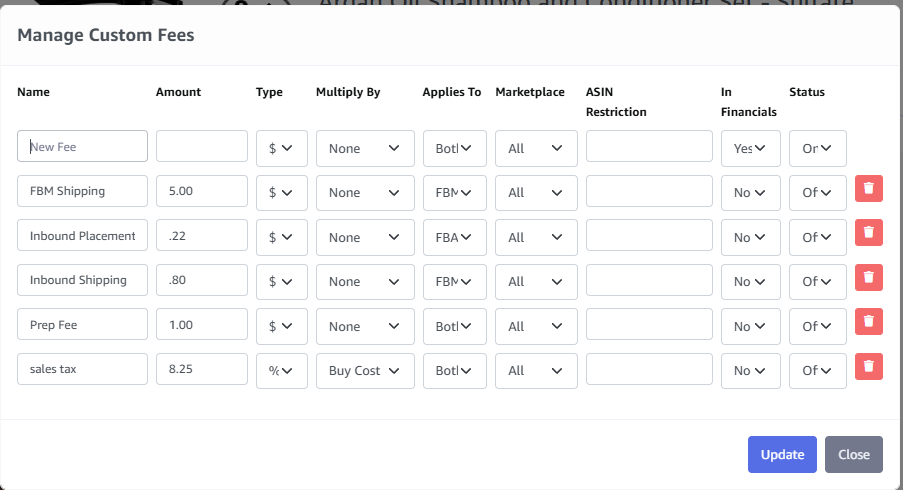
If your prep center charges per unit, add it. If inbound shipping averages $0.40 per unit for this type of product, add it. If the product needs bubble wrap, poly bags, or labels, account for it.
Profit that only exists when you ignore costs is not profit. It is fan fiction with a SKU.
It Tells You Which ASINs Are Worth Testing
Not every profitable-looking ASIN deserves a full purchase.
A profit calculator helps separate products into practical decisions:
- Skip: The ROI, margin, or profit is too weak.
- Watch: The ASIN could work if the price improves or the cost drops.
- Test small: The numbers work, but competition, price history, or confidence is uncertain.
- Buy confidently: The numbers meet your rules and the risk looks manageable.
For testing ASINs, use the calculator to ask what your expected profit is at the current Buy Box price, whether the deal still works after a 5% or 10% price drop, how many units you can test without tying up too much cash, and whether your account can sell the product.
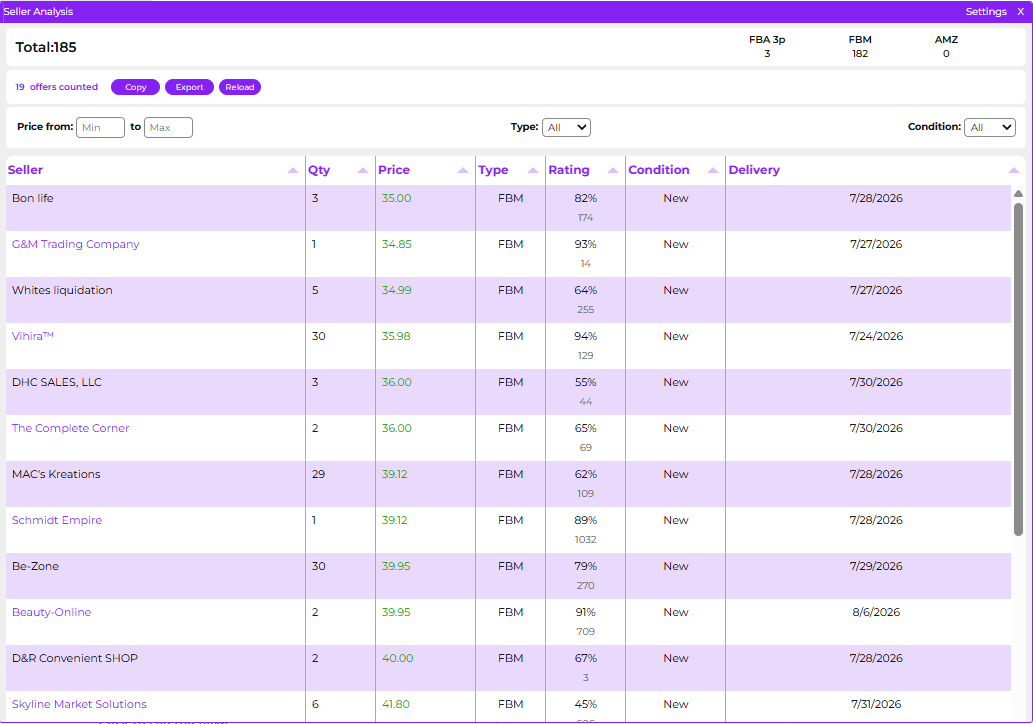
The competition question deserves more attention than most sellers give it. A product can be profitable on paper and still be a bad test if the listing is crowded with sellers who have deep stock and aggressive pricing.
3P Mercury's seller analysis helps show who you are competing against and how much inventory they appear to have. That gives you a better read on whether your test order can actually move, or whether your cash is about to sit behind sellers who are already stacked with inventory.
This is where 3P Mercury's Buy Rules become powerful. Instead of analyzing every ASIN from scratch with a mental checklist, you can define what a good buy looks like for your business.
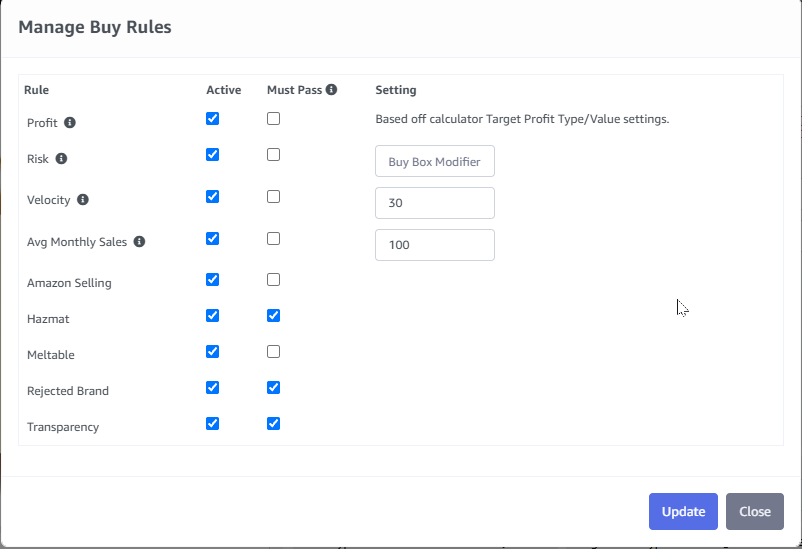
Your rules might require a 30% ROI, $3 minimum net profit, 12% margin, approval to sell, and a clean risk check. Once those standards are set, the calculator becomes more than a math box. It becomes a buying filter.
That matters because sourcing is not just about finding possible products. It is about finding products worth your cash, time, storage space, and attention.
It Catches Restrictions Before Inventory Becomes a Problem
Profit does not matter if you cannot sell the product.
This is one of the most painful mistakes for newer sellers. They find a great-looking deal, buy the inventory, send it in, and then realize the ASIN is restricted for their account.
Amazon restrictions can happen at different levels: ASIN, brand, category, condition, product type, hazmat, or approval-required products. Amazon also provides developer tools for checking listing restrictions by ASIN, marketplace, seller, and condition, which is exactly the kind of check sellers want before buying inventory.
Sometimes a seller may need invoices, product images, a letter of authorization, or other documentation. Sometimes the seller may not be eligible at all. Either way, you want to know before the purchase, not after the box is already sitting in your living room judging you.
3P Mercury can help surface seller eligibility problems during the analysis process.
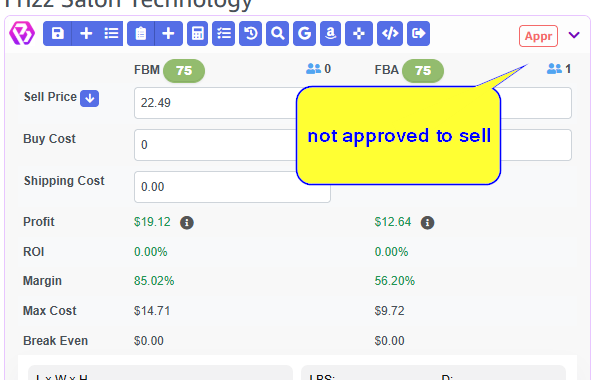
Hazmat is another check sellers should not treat casually. Some products may have dangerous goods restrictions, additional handling rules, or FBA limitations that change whether the product is worth pursuing. Even when the profit looks fine, hazmat uncertainty can slow the process down or create inventory headaches.
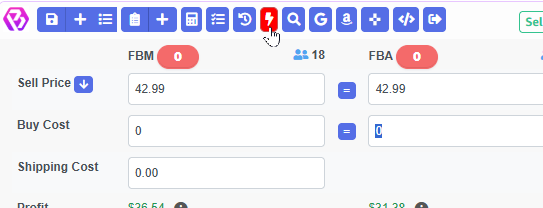
A profit calculator should not only answer "Is this profitable?" It should also help answer "Can I actually sell it?"
Those are two different questions. You need both.
It Turns Product Research Into a Repeatable Process
Most sellers start out analyzing products manually. They look at the price, rank, estimated sales, offers, fees, restrictions, and gut feeling. Then they decide.
That can work for five products. It gets messy at fifty. It gets very messy when you have a VA, a lead list, multiple suppliers, replenishable products, and a pile of possible ASINs waiting for review.
A profit calculator works best when it fits into a repeatable workflow:
- Open the Amazon product page.
- Check estimated profit, ROI, and margin.
- Add custom fees that apply to your business.
- Check approval, restriction, and hazmat status.
- Review competition and seller stock levels.
- Compare the ASIN against your buy rules.
- Decide whether to skip, test, watch, or buy.
- Save the product history so future decisions are faster.
3P Mercury brings those pieces together by using automated analysis and buy rules to help sellers make consistent decisions.
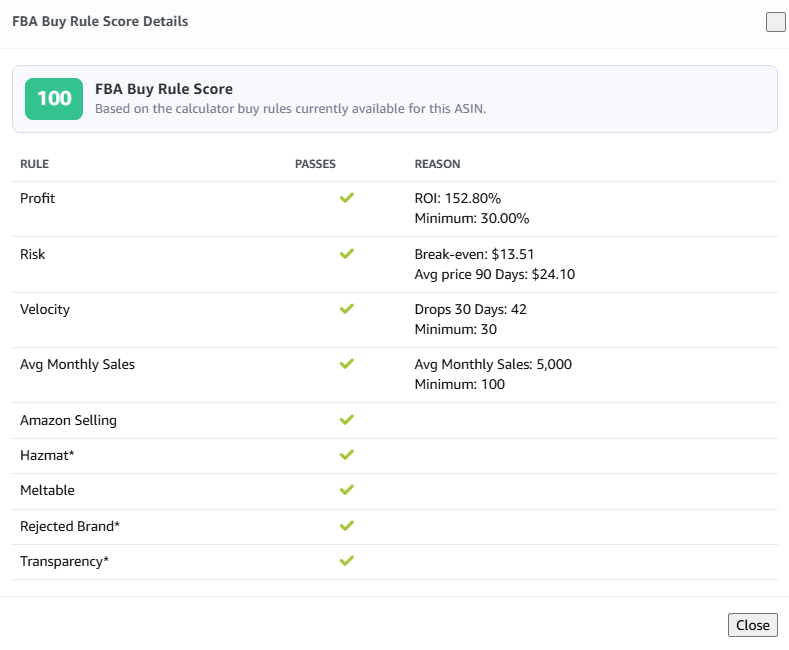
This protects sellers from the two classic sourcing problems: buying something because it feels good, and rejecting something because they forgot to check the full picture.
A calculator does not replace judgment. It gives your judgment better numbers to work with.
It shows what happened last time
A first-time buy is a test. A second buy should be a decision based on evidence.
If you already purchased an ASIN before, the next question should not be "Do I remember this one being good?" The question should be whether it sold, how fast it sold, what you paid last time, what it sold for, whether the price held, whether the profit matched the estimate, and whether you already have inventory or inbound units.
This is another place where 3P Mercury gives sellers an advantage. It can show inventory and purchase history alongside the current product analysis.
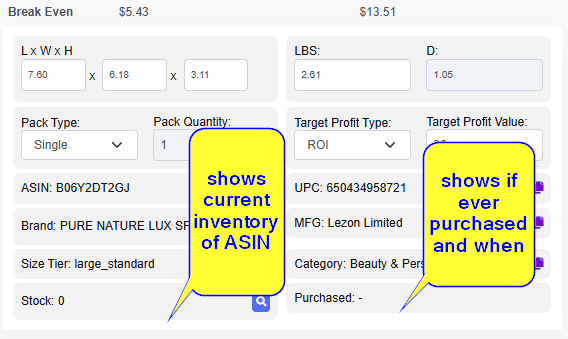
If the calculator says the ASIN is profitable today and your history says it sold well before, that is a stronger signal. If the calculator says it is profitable today but your last batch sat for 90 days, that deserves a second look.
Memory is a terrible inventory management system. It has no export button.
What sellers should look out for
A profit calculator helps, but sellers still need to watch for risk signals:
- Price stability: Does the current price look normal or temporarily inflated?
- Competition: Are there too many sellers fighting for the Buy Box, and do they have enough stock to keep pressure on the listing?
- Amazon presence: Is Amazon selling the product directly?
- Approval status: Are you allowed to sell the ASIN in the right condition?
- Hazmat status: Could dangerous goods rules, FBA limits, or extra handling requirements affect the buy?
- Variation issues: Is the rank attached to the variation you are actually buying?
- Size and weight: Are fees high because the product is bulky or heavy?
- Storage risk: Will slow movement create extra carrying costs?
- Return risk: Is the product fragile, technical, seasonal, or commonly returned?
- Cost accuracy: Did you include shipping, prep, labels, and other real costs?
The calculator should be the beginning of the decision, not the only decision. But without the calculator, sellers are often starting from the wrong number.
Why 3P Mercury Made the Calculator Free
Every seller needs fast profit math.
Not only sellers with a large budget. Not only sellers already doing big volume. Not only sellers who can justify another monthly subscription before they even know whether their sourcing process works.
A free Chrome extension gives sellers the basic tool they need before making buying decisions:
- See profit on the product page
- Add real costs
- Check fees
- Review ROI and margin
- Catch approval and hazmat issues
- Review seller competition
- Apply buying standards
- Avoid obvious bad buys
That is the point. The calculator should help sellers protect their money before they spend it.
3P Mercury's larger system can help with sourcing, lead analysis, purchasing, restocking, inventory, and shipping. But the calculator is the starting point because every good Amazon decision begins with one simple question:
Does this ASIN actually make money for me?
If the answer is no, skip it. If the answer is maybe, test carefully. If the answer is yes and the product passes your rules, now you have something worth reviewing.
That is how sellers stop buying hope and start buying numbers.
Frequently Asked Questions
What does an Amazon profit calculator do?
An Amazon profit calculator estimates net profit after referral fees, FBA fees, cost of goods, shipping, prep, storage, and other costs. It also helps sellers review ROI, margin, and break-even price.
Why should sellers use a profit calculator before buying inventory?
Sellers should use a profit calculator before buying inventory because a product can look profitable from the sale price but lose money after Amazon fees, prep costs, shipping, and price movement.
Can a profit calculator help decide which ASINs to test?
Yes. Sellers can use profit, ROI, margin, price-drop scenarios, custom fees, and buy rules to decide whether an ASIN should be skipped, watched, tested in a small quantity, or bought more confidently.
Can a profit calculator catch Amazon restrictions?
A profit calculator with restriction checks can help reveal ASIN, brand, category, condition, hazmat, or approval issues before the seller buys inventory. Sellers should still verify important eligibility checks inside Seller Central.
Why should sellers check competition before testing an ASIN?
Competition affects how fast a seller may win sales. Seller analysis can show competing sellers and estimated stock levels so sellers avoid testing ASINs where too much inventory is already pressuring the listing.
Is 3P Mercury's profit calculator free?
Yes. 3P Mercury's profit calculator Chrome extension is free and helps sellers check key buying numbers before they purchase inventory.
Related Reading
- For a complete buying workflow, read How to Purchase Effectively with 3P Mercury.
- If cash flow is the bottleneck, read How to Manage Amazon Cash Flow.
- To improve lead quality before analysis, read How to Source Properly with 3P Mercury.
Check the Numbers Before You Buy
Sign up for 3P Mercury to simplify your business. The one software that takes you from sourcing to shipping, automated with the power of AI.
Sign up for 3P Mercury